
Email Questionnaire4.15 - Download
You'll be able to download in few seconds.
Publisher Description
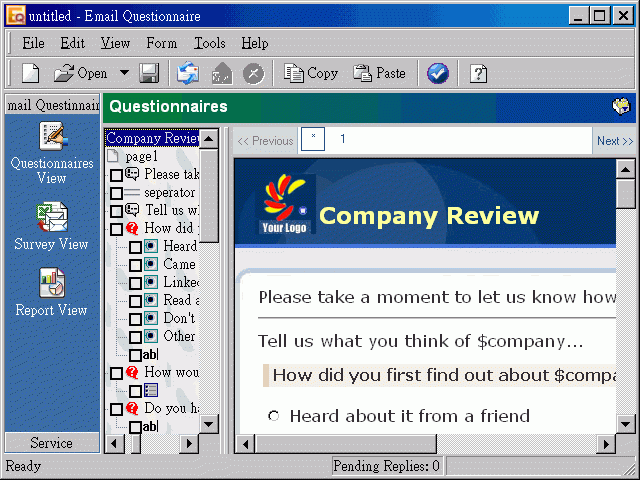
Email Questionnaire is a new type of questionnaire system that revolutionizes the way on-line questionnaires are conducted. Unlike other on-line questionnaire systems that need a web server to construct, distribute and manage results, Email Questionnaire is totally email based. It works with your existing email system making on-line questionnaire surveys available to anyone with an Internet connection.
Email Questionnaire makes customer relationship management easy. You can send new products information to customers and collect their interests. Other applications include employee surveys ,course feedback,marketing surveys, etc.
Features
Email based questionnaire software. No need for the Web servers.
Support Mail Merge to create personalized questionnaires.
Send questionnaires via SMTP/Exchange Servers.
Integrate with Outlook/Outlook Express seamlessly to get questionnaire replies.
Retrieve questionnaire replies from POP3 Servers.
Set required field to avoid missing answers.
Built in 30 HTML templates. Users could import their own HTML templates.
Support library questions to store frequently used questions.
Support various report formats: bar/pie/line 3D .
Resend to recipients that have not replied with a notification message.
About Email Questionnaire
This Email List Management program is available in English, Chinese, ChineseTraditional, French, German, Japanese, Spanish. It was last updated on 29 September, 2026. Email Questionnaire is compatible with the following operating systems: Windows.
The company that develops Email Questionnaire is Compressweb. The latest version released by its developer is 4.15.
The download we have available for Email Questionnaire has a file size of 3.1 MB. Just click the green Download button above to start the downloading process. The program is listed on our website since 2008-05-21 and was downloaded 0 times. We have already checked if the download link is safe, however for your own protection we recommend that you scan the downloaded software with your antivirus. Your antivirus may detect the Email Questionnaire as malware if the download link is broken.
How to install Email Questionnaire on your Windows device:
- Click on the Download button on our website. This will start the download from the website of the developer.
- Once the Email Questionnaire is downloaded click on it to start the setup process (assuming you are on a desktop computer).
- When the installation is finished you should be able to see and run the program.
Program Details
General
System requirements
Download information
Pricing
Version History
version 4.15
posted on 2008-05-21
Disclaimer
External Download
We do not host Email Questionnaire on our servers. We did not scan it for viruses, adware, spyware or other type of malware. This app is hosted by the software publisher and passed their terms and conditions to be listed there. We recommend caution when installing it.
The external download link for Email Questionnaire is provided to you by apps112.com without any warranties, representations or guarantees of any kind, so access it at your own risk.
If you have questions regarding this particular app contact the publisher directly. For questions about the functionalities of apps112.com contact us.
